|
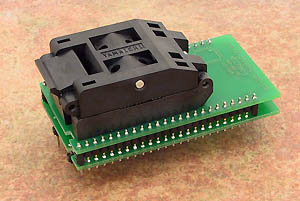
special adapter, assigned for NEC uPD78P014, uPD78P018 in QFP64 package
operation (mechanical) life of ZIF socket - 10.000 actuations
| Ord. no. |
70-0392 |
| Socket |
ZIF QFP64, ClamShell type |
| Bottom |
2 rows, 2x4 pins, square, 0.6x0.6mm, row spacing 600mil |
| Class |
Specialized |
| Subclass |
NEC MCU |
|
 |
|
Converter manual
-
Insert converter to the device programmer ZIF
socket according to the picture placed near of it.
If you have some doubts about orientation of this
converter in device programmer ZIF socket, it is
valid general rule, the orientation of the text of
title is the same as the text on the top of the
device programmer.
-
Open the converter ClamShell ZIF socket. Insert
the device into it (place device on contacts). The
right position of the programmed device in converter
ZIF socket is show at picture near (mainly left
above) the converter ZIF socket. On this picture
reference corner (e.g. position of pin 1) of device
is indicated by dot, by number 1, by bezel or by any
combination of them.
-
Visual check interconnection between device and
converter ClamShell ZIF socket. If everything looks
OK, close it and now, device is ready for
programming.
-
Be careful, because the incorrect insertion of
converter to the device programmer ZIF socket or
device to the converter ClamShell ZIF socket can
damage the programmed device.
-
When you finish work with adapter, remove it from
the device programmer ZIF socket.
- To take out the device, open
converter ClamShell ZIF socket and remove device from it.
- When you finish work with
converter, remove it from the programmer ZIF socket.
- Do not directly touch the pins of
the converter and converter ZIF socket, because dirt
may cause errors during programming of device.
- Operation conditions: operating temperature 5°C ÷
40°C (41°F ÷ 104°F), operating humidity 20%...80%,
non condensing.
- For handling with the device we
recommended to use a
vacuum pick up
tool.
Accepted package(s)
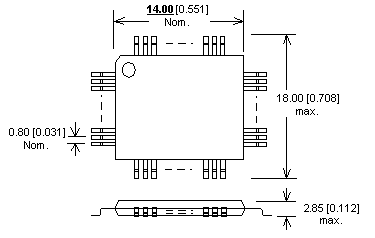
| QFP64 |
 |
|

|
 Back to top Back to top
The information in this document are subject to
change without notice.
|

